atlas search playground
easy experimentation with zero setup
Disclaimer: Certain details, processes, and data have been omitted from this case study due to a non-disclosure agreement (NDA). For a more comprehensive view of my work and design process, please contact me directly.
good to know terms
mongodb
a document database that stores data in flexible, JSON-like documents instead of traditional rows and columns. think of it like storing information in organized folders rather than spreadsheet tables.
atlas
mongodb's cloud service that manages databases for you. instead of setting up your own servers, atlas handles all the technical infrastructure in the cloud.
cluster
a group of servers working together to store and serve your data. creating one typically takes 10-15 minutes and requires configuration decisions about size, location, and security.
collections
mongodb's equivalent of database tables. they hold groups of related documents, like a collection of "movies" or "users" or "products."
search indexes
special data structures that make searching fast and powerful. they take 10-30 minutes to build and need to be configured for each type of search you want to perform.
aggregation pipeline
mongodb's query language that processes data through a series of stages, like a factory assembly line. each stage transforms the data before passing it to the next.
project overview
the challenge
atlas search is mongodb's full-text search solution. however, getting started required significant setup: creating a cluster, loading data into collections, building search indexes, and waiting for them to sync before writing your first query.
the solution
i designed the atlas search playground - a zero-setup environment where users can immediately experiment with atlas search using pre-loaded sample datasets and pre-configured search indexes. no cluster creation, no data loading, no waiting.
the impact
the playground became the fastest way to experience atlas search capabilities, serving as both a learning tool for new users and a demo environment for sales teams. it eliminated the biggest barrier to atlas search adoption: the setup friction.
understanding the friction
before the playground, trying atlas search meant navigating a complex setup process that could take hours or even days:
the old way
- create a mongodb atlas cluster
- load sample data into collections
- create and configure search indexes
- wait 10-30 minutes for indexes to build and sync
- learn the aggregation pipeline syntax and write your first search
result: many potential users abandoned the evaluation before seeing atlas search in action, often during the lengthy setup process
the playground way
- visit the playground url
- select a pre-loaded dataset
- run queries immediately
result: users experience atlas search value in under 60 seconds
the multi-view challenge
one of the key design challenges was that atlas search requires users to access multiple pieces of information simultaneously to write effective queries:
essential views needed:
- • index definition (field mappings and analyzers)
- • query syntax documentation and examples
- • data collection structure and sample documents
- • synonym collections (when applicable)
- • query results with relevance scoring
the design challenge:
traditionally, these were scattered across different interfaces and documentation pages. users would need multiple browser tabs and constant context switching to understand how their queries related to the underlying data structure.
technical considerations
the playground required careful technical design to provide a seamless experience while maintaining security and performance:
infrastructure design
user experience
design process
designing for developer comfort
a crucial insight was that developers are most comfortable in environments that feel familiar - like their IDE or command line interface. rather than creating a typical web application, i focused on emulating the multi-panel, information-dense layouts that developers use daily.
cli/ide inspiration:
- • dark theme with syntax highlighting
- • monospace fonts for code readability
- • resizable panels for information density
- • keyboard shortcuts for power users
- • real-time feedback and error highlighting
developer workflow patterns:
- • immediate execution and results
- • contextual help without leaving the interface
- • version control and sharing capabilities
- • progressive disclosure of advanced features
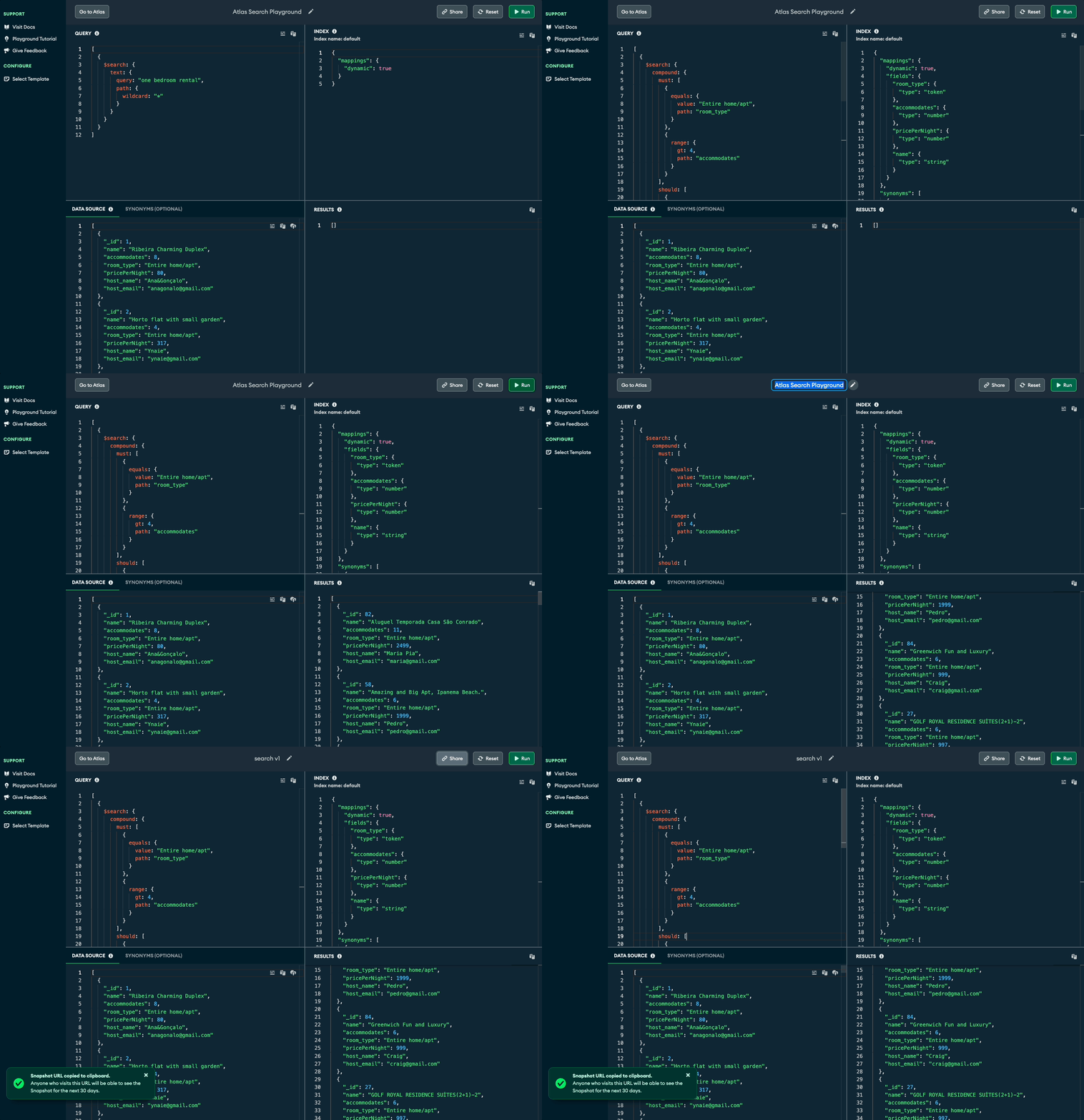
integrated multi-view environment
curated sample datasets
i designed a dataset selection experience featuring carefully chosen sample collections that showcase different atlas search capabilities:
movies dataset
demonstrates text search, faceting, and relevance scoring with familiar movie data
airbnb listings
showcases geospatial search and complex filtering with real estate data
sample analytics
demonstrates search across structured business data and time-based queries
integrated multi-view environment
the playground features a flexible panel system designed to provide all necessary information without overwhelming the user:
impact & adoption
immediate value delivery
business impact
key learnings
friction is the enemy of adoption
the biggest insight from this project was how dramatically setup friction impacts product adoption. even a few extra steps can cause potential users to abandon their evaluation. the playground proved that eliminating friction can transform a complex enterprise feature into an accessible, immediately valuable tool.
design for developer mental models
developers have strong preferences for interfaces that match their existing mental models. by emulating familiar ide and cli patterns - dark themes, syntax highlighting, multi-panel layouts, and keyboard shortcuts - the playground felt immediately comfortable and reduced the learning curve significantly.
the atlas search playground demonstrates how thoughtful design can transform complex enterprise features into accessible, immediately valuable experiences.